
Inside the release: what your beneficiaries actually experience with OSTREON
What happens, step by step, on the day your inheritance tree is triggered? A transparent walkthrough of the beneficiary journey — from the first email to the personal space — and the protections at each stage.

With OSTREON, nothing is released while you keep confirming you’re fine. If you stop, you receive daily reminders until you respond or until your chosen protection delay expires; you get emergency access first. Only then is each beneficiary notified by email with a unique link to their secure personal space, where they unlock only the assets you assigned them, using an activation link, a 32-character key sent separately, a one-time code sent to their own mailbox and a personal detail only they know. You are notified when access is granted and can revoke it from your inheritance tree.
- Nothing happens while you keep confirming you’re fine.
- You always get an emergency access window before anyone else.
- Beneficiaries pass several independent layers; OSTREON never holds their keys.
- Each person sees only their assets and messages — never the whole vault.
Trust in an inheritance platform comes down to one question: what exactly happens, and to whom? Here is the full journey, on both sides.
Before: your side
One click after logging in. New accounts start at 30 days. Notifications arrive by email today; app and SMS notifications are coming soon.
We remind you every day until you respond — or until the protection delay you set for your priority-1 beneficiary runs out.
A few days before your first beneficiary, you get emergency access to recover your account — the safety net for a forgotten password or a long absence.
The release: their side
Each beneficiary receives a unique, split copy of your key, usable only when your conditions are met. OSTREON never has access to their identification details or to the mailboxes used for their two-factor authentication.
What they see
- Only the assets you assigned to them, by priority.
- The documents, access details and instructions attached to those assets.
- Your personal messages addressed to them.
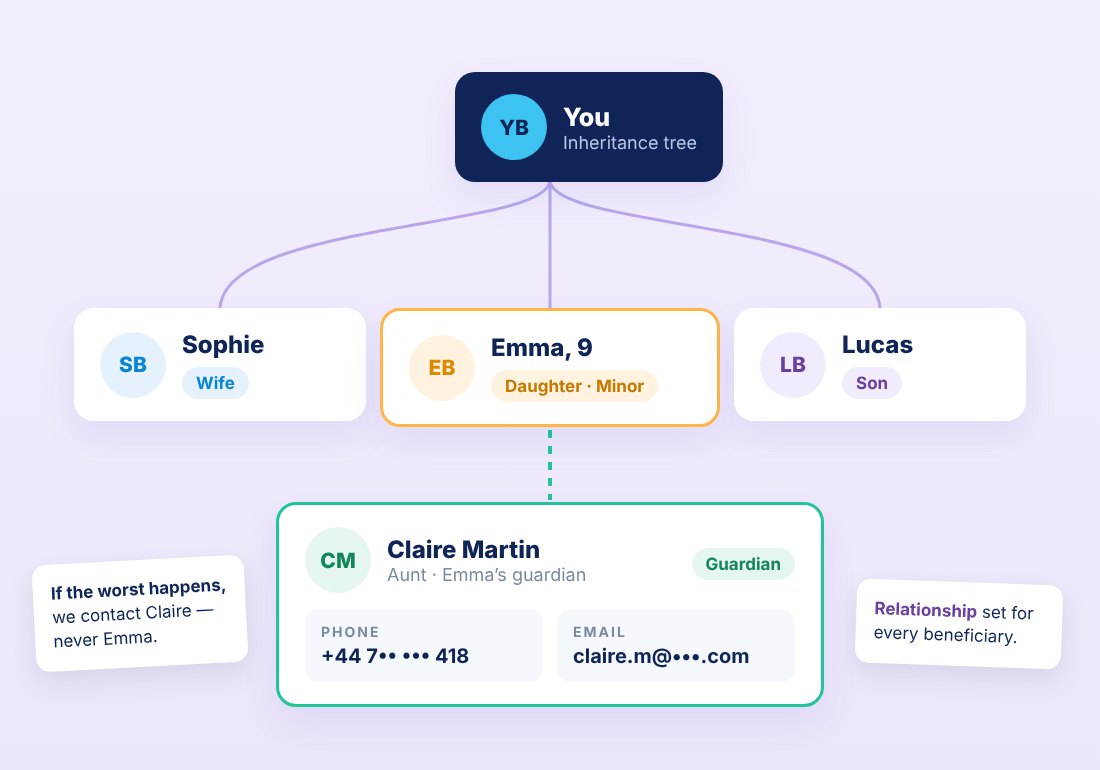
- For minors: nothing — their guardian receives the information instead (How to choose a guardian for your children: a decision guide).
What you stay in control of
You are notified when a beneficiary is granted access and when they log in, and you can revoke access at any time from your inheritance tree. A false alarm is reversible.
Sharing information does not by itself confer legal ownership. Your beneficiaries still follow the inheritance procedures of the relevant country — OSTREON makes sure they know what exists, where, and how to access it. We recommend reviewing your plan with a notary or lawyer.
Set it up once. OSTREON watches over the rest.
List your assets, choose who gets what, confirm you're fine from time to time. If one day you no longer can, each loved one receives secure access to exactly what you chose — nothing more, nothing sooner.
Start your free month →Frequently asked questions
What happens if I miss an OSTREON check-in?
You receive daily reminders until you respond or until the protection delay you set expires. Nothing is released while you keep confirming you’re fine.
How do OSTREON beneficiaries access their inheritance?
They receive an email with a unique activation link, a separate 32-character key, a one-time code via their own mailbox, and complete their personal key with a detail only they know.
Can a beneficiary see everything in my vault?
No. Each beneficiary sees only the assets, documents and messages you assigned to them.
What if the release is triggered by mistake?
You get emergency access before any beneficiary, you are notified when access is granted and when beneficiaries log in, and you can revoke access at any time.
This article is general information, not legal, tax or financial advice. Rules differ by country and change over time — check with a qualified notary, lawyer or adviser for your situation.